Gacha Plus Apk v1.2.1 Download
Download the latest available version of Gacha Plus APK for Android and PC:
| 🔎Name | Gacha Plus |
| 🔗Version | 1.2.1 |
| 🗓 Date | May,2023 |
| 📱 Devices | Android, Pc |
| ⚖️Size | 133 MB |
| ✔️Made by | FémlolStúdió |
| 💲 Price | Free |

What is Gacha Plus?
Gacha Plus is a Gacha Club mod with an emphasis on quality and innovation. Offering new assets, higher-quality backgrounds, and so much more, this mod does not replace any existing assets but elevates the game instead. Updated every two weeks with new original assets, Gacha Plus aims to make the game better than ever before.Features of Gacha Plus
Here are some of the standout features of Gacha Plus:- Extended Asset Library: Unleash your creativity with an array of new assets.
- Higher Quality Backgrounds: Get access to HD backgrounds exclusive to Gacha Plus.
- Frequent Updates: Enjoy bi-weekly updates filled with new original assets.
- Unaltered Original Assets: The mod does not replace any existing assets, ensuring a seamless transition for existing users.
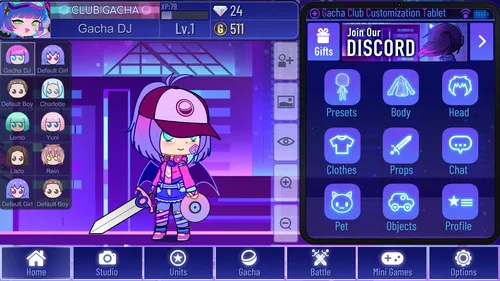
How to Download & Install Gacha Plus for Windows
Downloading Gacha Plus for your Windows PC is a breeze, and we've laid out the steps below to guide you through the process:- Click the Download Button designated for the Windows version and click on it.
- Once you've clicked the download button, wait for the download to finish.
- After the download is complete, go to your 'Downloads' folder to find the downloaded file.
- The downloaded file is in a zipped format. To unzip it, right-click on the file and choose 'Extract All'.
- Follow the on-screen prompts to complete the extraction process.
- Open the extracted folder and locate the installation file, usually an .exe file.
- Double-click to start the installation.
- The installation wizard will guide you through the remaining steps to get Gacha Plus set up on your computer.
How to Download Gacha Plus for Android?
If you're an Android user keen to explore the enhanced features of the mod, follow these simple steps to download and install Gacha Plus on Android:- Find the Android Download Button.
- Tap the download button and wait for the download to complete.
- You can pull down your notifications screen to confirm the download progress.
- After the download is finished, you may see a prompt asking for permission to install from unknown sources. To allow this, go to your device settings and navigate to Security > Install Unknown Apps and enable the option.
- Once you've enabled installations from unknown sources, locate the downloaded APK file, usually in your 'Downloads' folder, and tap on it to begin the installation process.
- Follow the on-screen instructions to complete the installation and start enjoying Gacha Plus on your Android device.
Download Gacha Plus for Android 32-Bit
Download and play Gacha Plus on 32 Bit Android devices: Download Gacha Plus APK for Android 32 BitDownload Gacha Plus for Android 64-Bit
Download and play Gacha Plus on 64 Bit Android devices: Download Gacha Plus APK for Android 64 BitHow to Download and Install Gacha Plus on Chromebook?
If you are using a Chromebook device to play Gacha Plus, you need to perform the following steps:- Go to the left menu and activate "Linux option (beta)", then enable ADB debugging.
- Restart your device and accept the warning prompt.
- Open the terminal and enter sudo apt-get install android-tool-adb -y.
- Connect ADB to Linux using ADB connect 100.115.92.2:5555 and allow USB debugging.
- Download the appropriate APK version and save it in the Linux folder in My Files.
- Open the terminal and use the command abd install (filename).apk.
Is Gacha Plus on iOS?
Currently, Gacha Plus is not officially available on iOS. Stay tuned for updates from the development team regarding this.Gacha Plus Update to the Latest Version
Gacha Plus offers updates every two weeks, continually enriching your gaming experience with new assets and features. Make sure you're using the latest version for an optimal experience. Keeping your Gacha Plus game up-to-date ensures that you're always enjoying the latest assets, features, and improvements. To update the game, it's crucial to first save all your Original Characters (OCs) to prevent any loss of your creative works. Once your OCs are safely stored, proceed to uninstall the existing version of Gacha Plus from your device. After that, simply revisit the official Gacha Plus website to download the latest version, following the installation steps outlined in our guide for either Windows or Android. By doing so, you'll seamlessly transition to the updated version and continue to immerse yourself in the enriched Gacha Club experience that only Gacha Plus can offer.Requirements of Gacha Plus
- Requirements for Windows: Windows 7 or higher, 2GB RAM, and 133MB free disk space.
- Requirements for Android: Android version 5.0 or higher, 2GB RAM, and 133MB free disk space.